
DocuSign vs Escra: Identity, Proof & Auditability
DocuSign is the most familiar name in electronic signatures. It delivers speed, accessibility, and workflow convenience for millions of users. Escra approaches the same problem from a different foundation. Instead of relying on account based actions and platform controlled logs, Escra treats every signature as a cryptographic event tied to a verified identity.
This comparison outlines the architectural differences so teams can understand when each model fits their needs.
How does DocuSign’s model work?
DocuSign’s signing flow is optimized for ease of use.
A user logs into an account
The platform authenticates the session
The user clicks to sign
DocuSign records the event in its internal audit trail
The system is built on trust in the platform. The signature is the platform’s confirmation that a specific account triggered the action. This is effective for low risk agreements and routine workflows where identity assurance is not critical.
Where do the limits start to appear?
Identity
In many traditional e-signature systems, the signing event is tied to an authenticated account or session rather than to a cryptographically bound individual identity. Identity verification often happens before or outside the signing moment and relies on standard authentication methods such as email access, passwords, or MFA. If those credentials are compromised, the system may still register the action as valid because the platform confirms the account activity, not the person behind it.
Proof
Traditional e-signature platforms generally record evidence of a signing event through platform generated logs and audit records. These records indicate that an action occurred within the system but do not typically create a standalone cryptographic artifact that can be independently verified outside the platform.
Auditability
Audit trails in conventional e-signature systems are usually platform controlled. While logs can be exported and reviewed, their validity depends on trust in the platform that generated them. They describe what the system observed, rather than providing mathematically verifiable proof that can be validated independently. These constraints reflect the original design goals of most e-signature tools, which prioritize usability, speed, and workflow efficiency.
How does Escra approach the same workflow?
Escra replaces account based signing with identity-bound cryptographic signing. Identity is verified at onboarding. A key pair is issued to a real person. Every signing action is authenticated then produced with that key and can be validated by anyone.
The result is a different trust model entirely:
Identity is proven, not assumed
The signature can be verified by anyone
The signature authenticity is validated by the contract itself
The audit trail exists independently of the platform
Compromise is far harder because keys are encrypted and cannot be falsified
The record becomes a mathematical truth rather than a vendor-generated statement
Escra is designed for teams that need high assurance records rather than platform dependent logs.
When is traditional e-sign the right fit?
Internal approvals
Low risk documents
General operational workflows
Teams that prioritize speed over verification
Individuals that only need an e-signature
DocuSign remains excellent in these scenarios.
When is Escra the better choice?
Workflows involving high value and/or regulated agreements
Situations where identity must be proven and preserved
Processes requiring independent auditability
Environments with increased fraud or compliance scrutiny
Contracts that require a unified task management platform to execute
Escra serves as a verifiable execution layer for teams that cannot rely solely on trust in a platform.
See how we stack up:
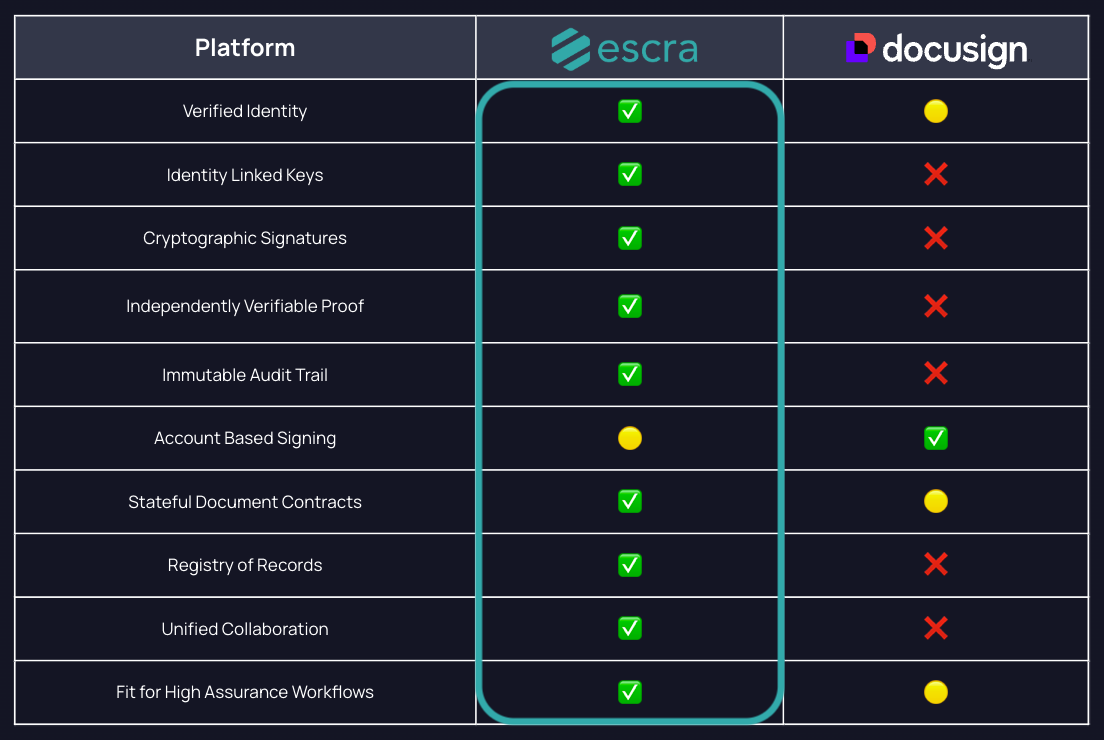
Information compiled from publicly available documentation and product demonstrations on the respective company website of DocuSign.
Data accurate as of December 2025. Where specific features were not explicitly documented, assessments are based on available product information. Some features may require specific subscription tiers. Features and capabilities are subject to change.
Green Check (✓): Full feature set supported.
Yellow Dot (•): Partial or indirect support for the feature.
Red X (✗): Feature not available.
